
You closed the deal. The client is onboarded. The project has kicked off.
Now comes the part most service businesses quietly struggle with: keeping everyone — your team, your client, your timelines, and your budget — aligned as the project moves forward.
Most teams default to a mix of WhatsApp groups, shared spreadsheets, and email chains. It works until it doesn’t. And when it doesn’t, it’s usually because a deadline was missed, a deliverable fell through the cracks, or the client asked for an update and nobody had a clear answer.
The solution isn’t more tools. It’s the right tool — specifically, a CRM platform that’s built to handle both client relationships and project execution in one place.
This guide walks you through exactly how to use a CRM to track project progress in 2026 — from the moment a deal closes to the final invoice.
What Does “CRM Project Tracking” Actually Mean?
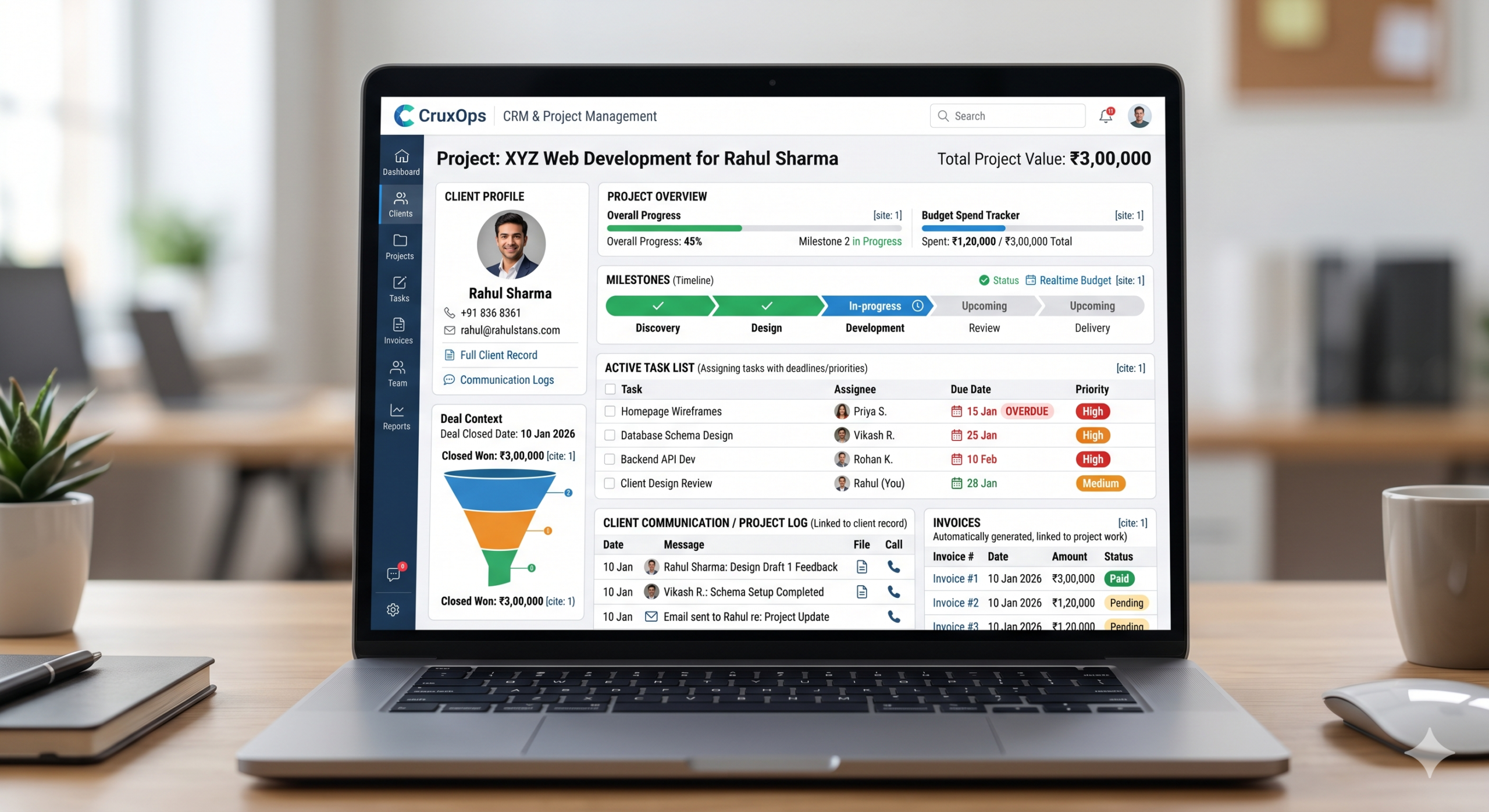
CRM stands for Customer Relationship Management. Traditionally, it managed sales pipelines and customer data. But modern CRM platforms have evolved significantly.
Today, a CRM with integrated project management lets you:
- Convert a closed deal directly into a project — no re-entering data
- Assign tasks to team members with deadlines and priorities
- Track project milestones and budgets in real time
- Link every task and update to the relevant client record
- Generate invoices from completed project work automatically
The result: your sales context and your delivery context live in the same place. The client who signed a ₹3L project can be found alongside every task, communication, and invoice related to that work — all in one screen.
Why Spreadsheets Break Down at Scale
If you’re a solo operator or a team of 2–3, a shared Google Sheet can work. But as soon as you have multiple clients, multiple projects, and a team of more than 3 people — spreadsheets create more problems than they solve.
Here’s what typically goes wrong:
- No real-time updates. Someone finishes a task and forgets to update the sheet. A manager acts on stale data.
- No accountability. A spreadsheet can’t send reminders, flag overdue tasks, or reassign work when someone is overwhelmed.
- No client context. A spreadsheet doesn’t know who the client is, what they were promised, or what your last conversation with them was about.
- No financial visibility. There’s no connection between the tasks you’re doing and the billable hours you should be invoicing for.
A CRM fixes all of this — not by adding complexity, but by connecting information that currently lives in separate places.
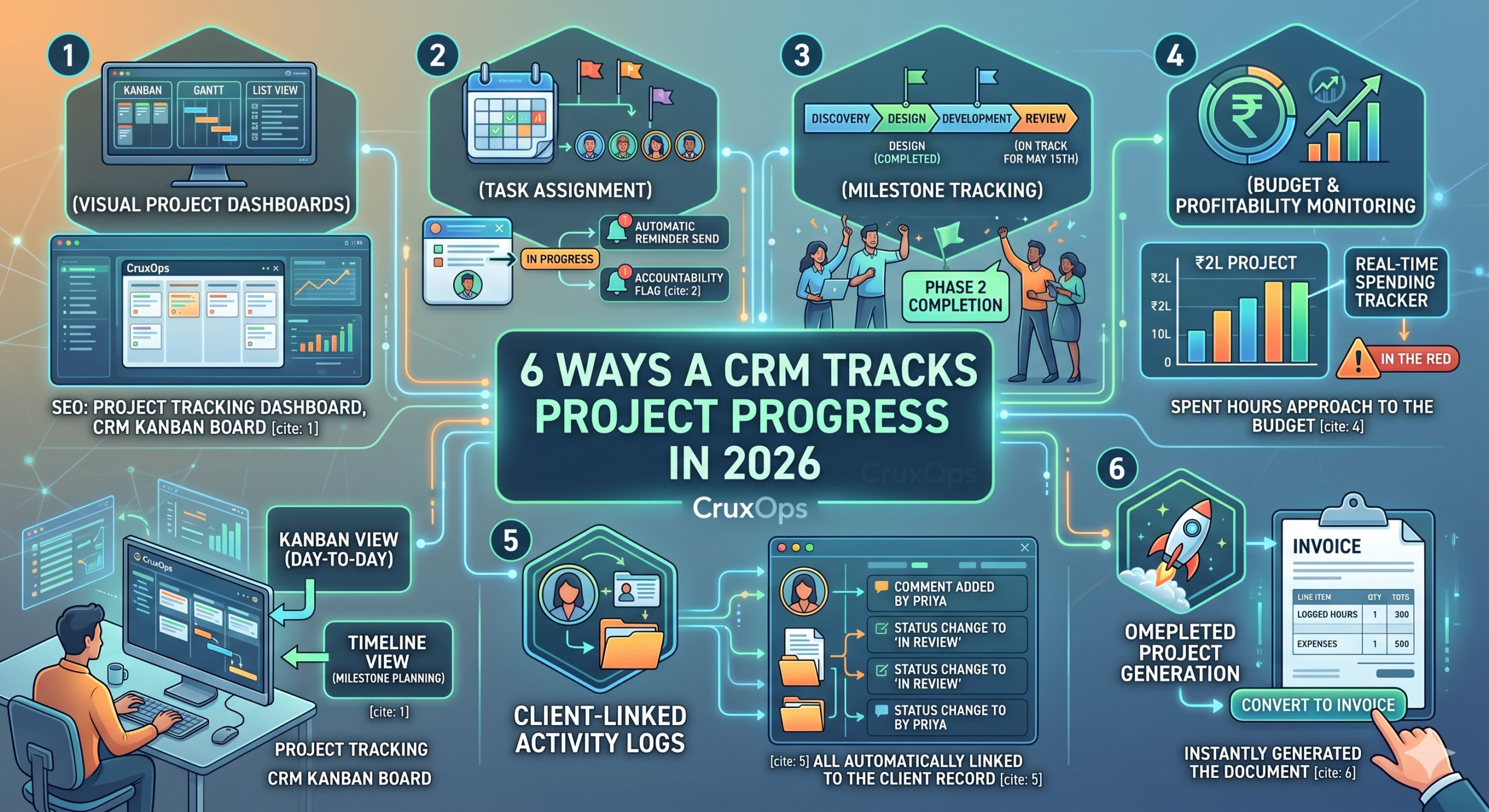
6 Ways a CRM Tracks Project Progress in 2026
1. Visual Project Dashboards
A good CRM gives you Kanban boards, Gantt charts, and list views for every project. You can see at a glance which tasks are in progress, which are overdue, and which are completed — without asking anyone for an update.
In CruxOps, for example, you can switch between Kanban view (for day-to-day task management) and a timeline view (for milestone planning) within the same project. Both update in real time as team members log progress.
SEO keyword served: project tracking dashboard, CRM kanban board
2. Task Assignment with Deadlines and Priorities
Every task in a CRM project can be assigned to a specific person with a due date, priority level, and set of subtasks. When a deadline approaches, the system sends automatic reminders — no manual follow-up needed.
This also creates clear accountability. There’s no “I thought you were doing that” moment when every task has one owner and a visible status.
3. Milestone Tracking
For longer projects — a website build, an app launch, a marketing campaign — milestones break the work into stages. Each stage has a target date and a set of tasks that must be completed before the next begins.
Milestone tracking in a CRM gives clients (and your internal team) a clear sense of progress. Instead of a vague “it’s going well,” you can say “we’ve completed Phase 1 and Phase 2. Phase 3 delivery is on track for May 15th.”
4. Budget and Profitability Monitoring
This is where CRM project tracking pulls ahead of standalone project management tools.
Because your CRM already knows what the client was invoiced for, and your project module knows how many hours were logged and what expenses were incurred, it can calculate project profitability in real time.
If a ₹2L project has already consumed ₹1.8L worth of team time with 40% of the work remaining — your CRM flags it before you’re in the red.
5. Client-Linked Activity Logs
Every update, comment, file upload, and status change in a CRM project is logged against the client record. So if a client calls and asks what’s happening, anyone on your team can pull up the full picture in seconds — not just the project manager.
This is especially powerful for agencies and consultancies where multiple team members interact with the same client.
6. One-Click Invoice Generation from Project Data
When a project is complete (or when a milestone billing point is reached), a CRM lets you convert project data — logged hours, expenses, deliverables — directly into an invoice. No retyping. No reconciliation.
In CruxOps, this happens in one click: open the project, click “Convert to Invoice,” and all billable items are pre-populated. You review, add your payment terms, and send.
The 2026 Shift: AI-Assisted Project Tracking
One thing that’s changed meaningfully in 2026 is the role of AI inside CRM platforms. Modern CRM systems can now predict customer behaviour, personalise interactions based on accumulated data, and provide actionable insights that make managing projects easier.
In practical terms for project tracking, this means:
- Automated risk flags when a project is trending behind schedule
- Suggested task priorities based on deadlines and team workload
- Smart summaries of client communication history before a meeting
- Predictive invoice timing based on past project patterns
This isn’t a feature reserved for enterprise software anymore. Platforms built for Indian SMBs are beginning to incorporate these capabilities at accessible price points.
How to Set Up CRM-Based Project Tracking: Step-by-Step
Step 1: Convert your closed deal into a project
When a proposal is accepted, don’t start a fresh project from scratch. Use the CRM’s “convert to project” function — it carries over the client name, scope summary, agreed pricing, and timeline automatically.
Step 2: Break the project into milestones
Map the project stages (Discovery → Design → Development → Review → Delivery, for example). Assign a target date to each milestone.
Step 3: Create tasks under each milestone
Each milestone should have 3–10 specific tasks. Assign each to a team member with a due date and priority level. Add a checklist within each task if there are sub-steps.
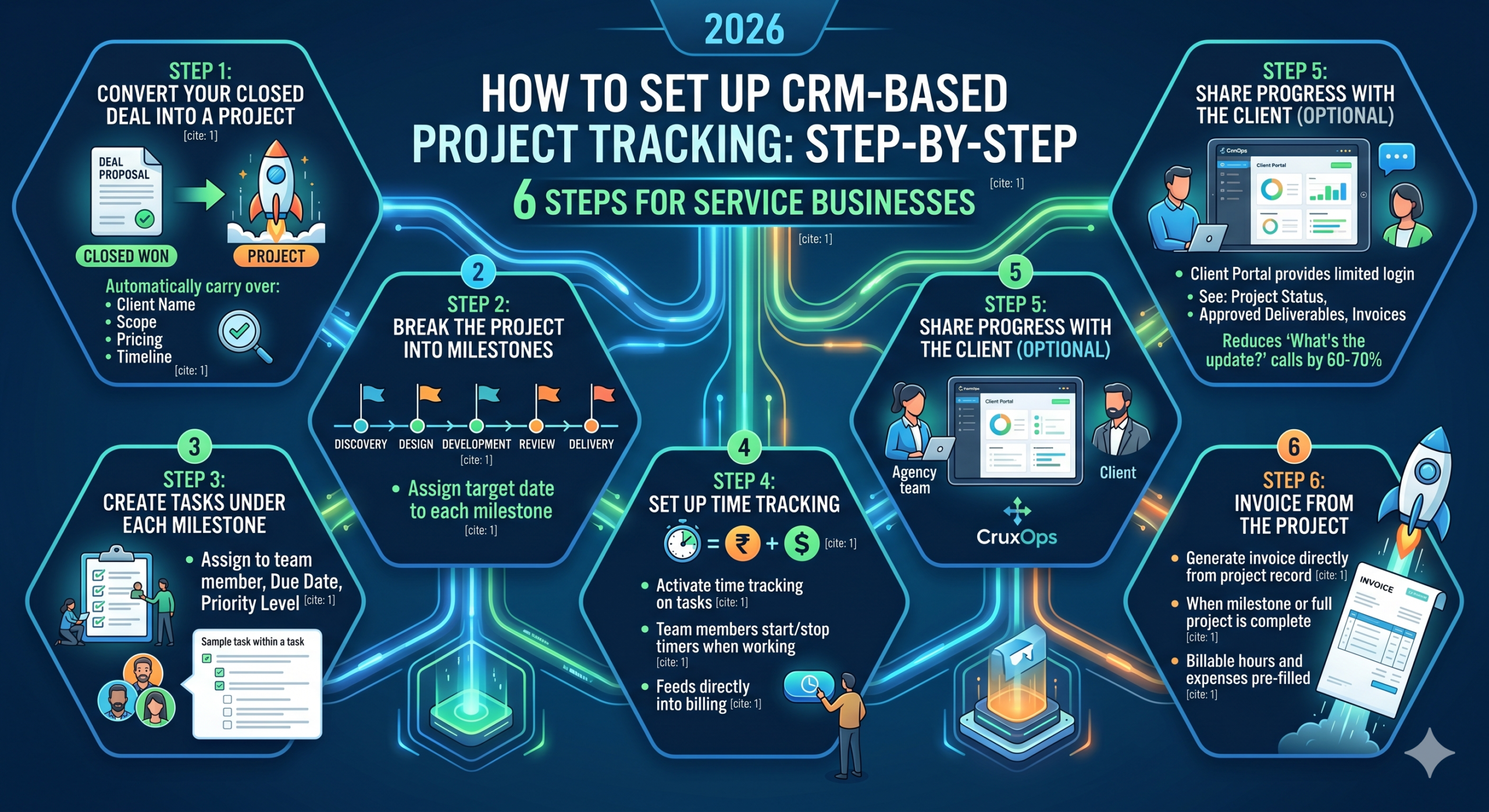
Step 4: Set up time tracking
If your project is billed on time spent, activate time tracking on tasks. Team members start a timer when they begin work and stop it when they’re done. This feeds directly into billing at the end.
Step 5: Share progress with the client (optional)
Most modern CRMs offer a client portal — a limited login the client can use to see project status, approved deliverables, and invoices. This reduces “what’s the update?” calls by 60–70% for most teams.
Step 6: Invoice from the project
When a milestone or the full project is complete, generate the invoice directly from the project record. All billable hours and expenses are pre-filled.
Signs You Need a CRM for Project Tracking Right Now
If any of the following describes your team, a CRM project module will make a visible difference within the first month:
- Projects regularly run over deadline or budget without early warning
- Clients frequently ask for updates you can’t answer immediately
- Different team members have different versions of “what’s happening”
- You’re losing billable hours because they weren’t tracked or captured
- Onboarding a new project means manually copying data from the proposal
CruxOps: Built for Service Businesses That Manage Both Clients and Projects
CruxOps is designed specifically for the way Indian service businesses work — agencies, consultancies, IT firms, legal practices, and more.
The platform handles the full journey: lead capture → proposal → project → task → timesheet → invoice → support ticket — all linked to the same client record, with no switching between tools.
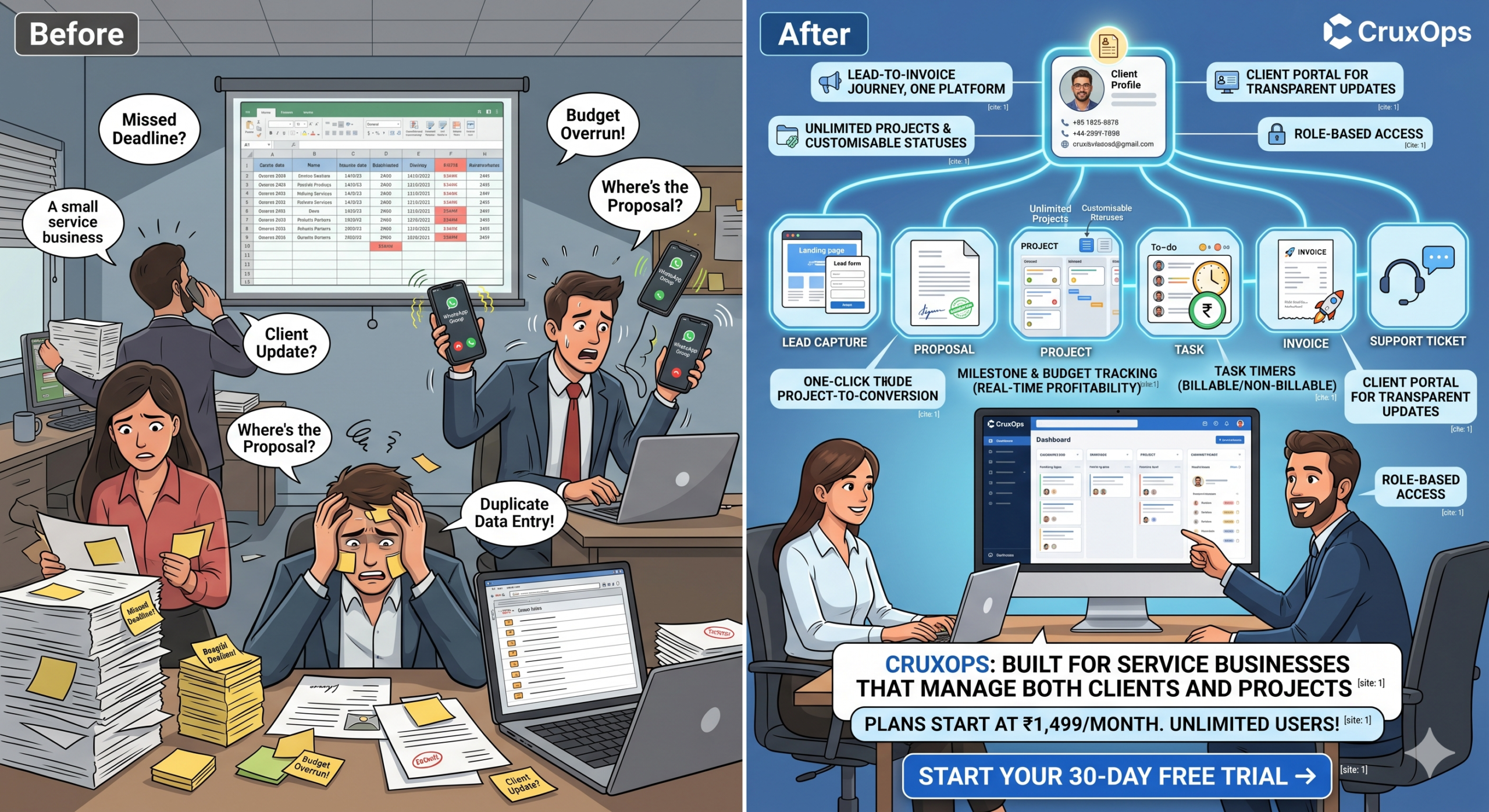
Key project tracking features in CruxOps:
- Unlimited projects with customisable statuses
- Kanban and timeline views switchable within each project
- Milestone and budget tracking with real-time profitability
- Task timers with billable/non-billable separation
- One-click project-to-invoice conversion
- Client portal for transparent project updates
- Role-based access so clients only see what they’re meant to see
Plans start at ₹1,499/month with all features included and unlimited users — no per-seat pricing surprises.
Start your 30-day free trial →
Frequently Asked Questions
Can a CRM replace dedicated project management tools like Asana or Jira? For most service businesses — agencies, consultancies, professional services — yes. If your projects are client-facing and linked to invoicing, a unified CRM handles this better than a standalone PM tool, because all client context is in one place. For highly technical, engineering-heavy projects, a dedicated PM tool may still be preferred.
How long does it take to migrate from spreadsheets to a CRM? With a platform like CruxOps, most teams are operational within 2–3 days. The onboarding team helps you set up your first projects, import client data, and train your team. A structured 1-hour session with your team is usually enough to get comfortable.
Is CRM project tracking suitable for freelancers? Yes. Even solo operators benefit from CRM project tracking — especially for managing multiple clients simultaneously, tracking billable hours accurately, and automating invoice generation.
What’s the difference between a CRM and project management software? A CRM focuses on managing customer relationships — leads, communication history, deals. Project management software focuses on task tracking, timelines, and team collaboration. A unified platform like CruxOps combines both, which is especially valuable when your projects are client-funded deliverables.
Final Word
Tracking project progress in 2026 isn’t about adding more check-ins or more update meetings. It’s about building a system where the status of every project is always visible, always current, and always connected to the client it belongs to.
A CRM that handles both relationships and delivery isn’t a luxury for growing service businesses — it’s the foundation of consistent, profitable project execution.
The question isn’t whether you should track projects using a CRM. It’s how much time and money you’re losing by not doing it yet.
Related reading: